Work Breakdown: Checklists, Subtasks, and Dependencies
Use a checklist for checks within one result, subtasks for outcomes you need to track separately, and dependencies to record which task comes first. These choices answer different questions, so one project can use all three.
This guide uses a fictional personal project: publishing a small project landing page. The page needs a short introduction, a screenshot, a working contact link, and a final check at phone and desktop widths.
Work breakdown starts with the result
“Work on the landing page” gives you a subject, but no clear stopping point. “Publish the landing page” names a result you can check.
Before splitting it, write what would count as done:
The public page has an introduction, a screenshot, and a working contact link. I have opened it at phone and desktop widths and checked every link.
That description sets the scope. It does not require a separate card for every sentence you write or every link you test.
Compare checklists, subtasks, and dependencies
| Choice | When to use it |
|---|---|
| Checklist | Check parts of one result without separate stages, such as the contact link and image description. |
| Subtask | Track a distinct outcome with its own progress or details, such as writing the introduction or preparing the screenshot. |
| Dependency | Record task order when one needs another’s result, such as publishing the page before sharing it. |
A due date alone does not require a subtask. In toodoori, checklist items can have their own due dates. The more useful question is whether you need to follow that piece of work separately.
Keep checks for one result in a checklist
If the landing page is small enough to handle as one task, its final checks can stay together. In the example below, URL means Uniform Resource Locator, or web address:
Task: Publish the landing page

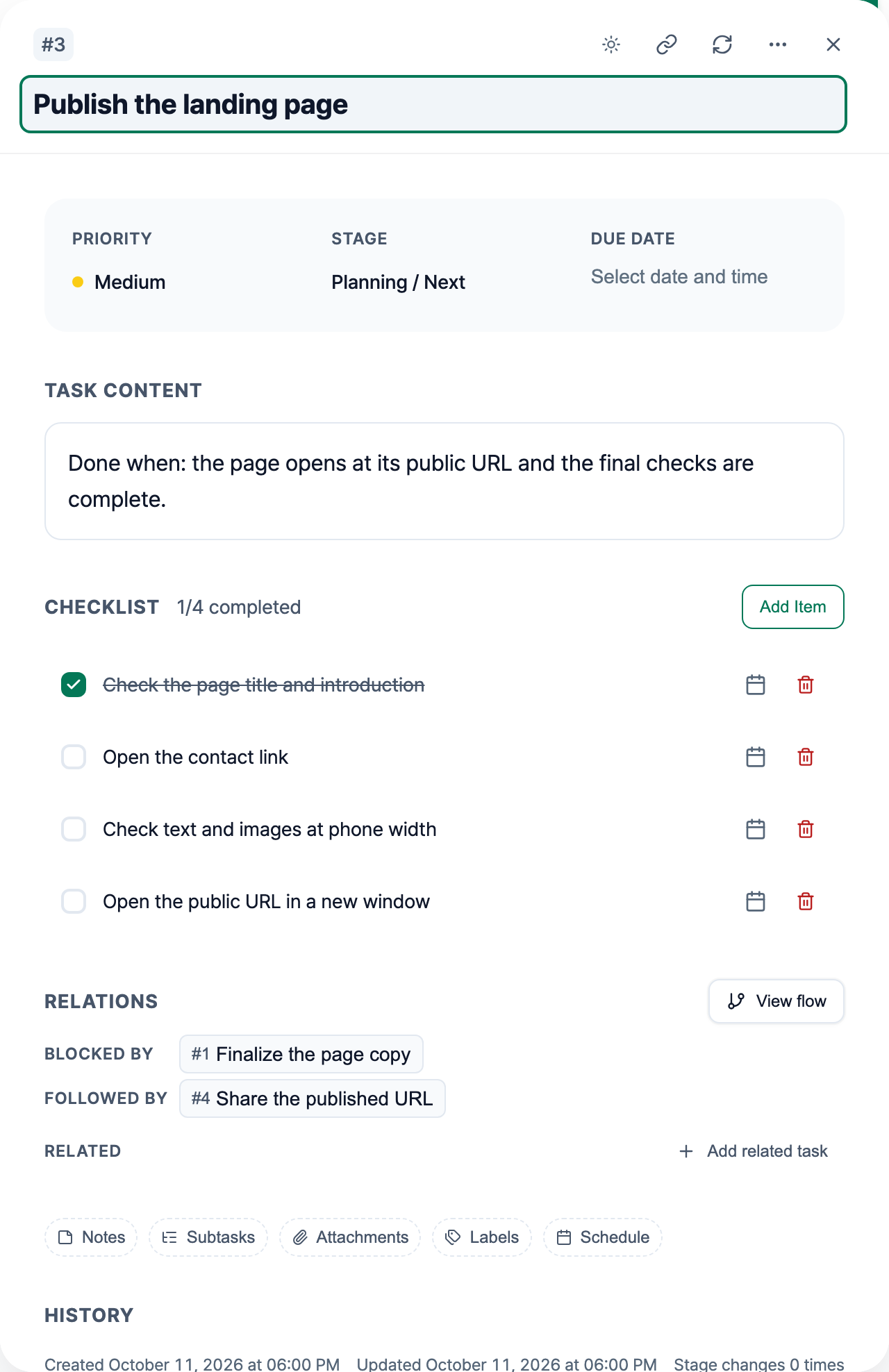
- [ ] Check the page title and introduction
- [ ] Open the contact link
- [ ] Check text and images at phone width
- [ ] Open the public URL in a new window
Each item helps verify the same result. You can see which checks remain without maintaining four separate task cards.
Check the title, link, and phone layout before publication. Open the public URL afterward. These are checks you perform yourself; the app does not enforce their sequence. For instructions on adding and checking items, see Task Cards. For reusable lists, see Task Checklist Examples: 4 Checklists and a Template.
Use subtasks when outcomes need separate progress
Now suppose the introduction is ready, but the page layout still needs a screenshot and a contact link. One progress state no longer describes the work well.
You could keep “Publish the landing page” as the parent task and create two subtasks:
- Finalize the page copy: done when the introduction states what the project does and who it is for.
- Build the page layout: done when the draft contains the approved text, a current screenshot, and the contact link.
Each subtask has its own result to inspect. Keep small checks, such as testing the contact link, inside the relevant task. You do not need to split every action merely because subtasks are available.
Use dependencies to record order
Subtasks describe the parts of a larger task. Dependencies describe the order between tasks. The copy needs to be final before publication, and you need a public page before sharing its address.
For this example, record the sequence as:
- Finalize the page copy before publication.
- Publish the landing page once the page is ready.
- Share the published URL after checking the public page.
In the screenshot, Publish the landing page lists Finalize the page copy under Blocked by and Share the published URL under Followed by. Related links tasks without prescribing an order. See Task Relations: Dependencies and Linked Tasks for the controls and flow view.
Relations do not prevent you from moving or completing a task. They do not automatically complete other tasks. You review the linked work and decide when to proceed.
Choose the smallest structure you need
Before adding another card, ask what you would lose by keeping the action inside its current task. If you only need a checked or unchecked state, a checklist may be enough. If you need separate progress and detail, use a subtask. If the question is what must happen first, record a dependency between the relevant tasks.
Once the pieces are clear, choose which one to start. WIP Limits: Choosing What to Start and What to Defer covers that decision. If your starting point is a conversation, Turn AI Chat into Tasks: A Worked Example shows how to review proposed tasks before saving them.