How to Choose a Kanban App
Search for a kanban app and most of what you’ll find is team project management tools. If you’re looking for something to use on your own, the criteria are different. This guide covers five things to check when choosing a personal kanban app, plus what to look at before starting on a free plan. If kanban itself is new to you, start with What Is Kanban?.
Team Kanban Tools and Personal Kanban Apps Are Different
Team kanban tools center on permissions, assignees, and reporting. All those features mean more to configure when you work alone — and every time you open the board, you’re looking at screens you don’t need.
A personal kanban app is the opposite: simplicity is the point. The whole loop — writing things down, picking what to do today, finishing — has to feel light, or you won’t reach for it daily. The methodology side is covered in What Is Personal Kanban?.
Five Things to Check
1. Is there a place to drop things as they come up? — Tasks don’t only occur to you at your desk. An inbox that accepts items without requiring you to organize them lowers the friction of capturing.
2. Does your work show up as a flow of stages? — States like To Do, In Progress, and Done should appear as columns — that’s what makes it kanban. Check whether you can shape the stages to match your own flow.
3. Can you limit work in progress? — Half of what makes kanban work comes from WIP limits (capping how many things you work on at once). An app without this is closer to a list shaped like a board. Why WIP limits work is covered in WIP Limits: Choosing What to Start and What to Defer.
4. Can a card hold as much — or as little — as you need? — Due dates, checklists, labels, notes. But “can hold” and “must fill in” are different things — an app with many required fields makes even writing something down feel like a chore.
5. Does finished work stick around? — In many apps, completed cards simply vanish. Records need to stay for you to look back on your own flow. See Weekly Retrospective Questions and a Worked Example.
Before You Start on a Free Plan
- Free plan limits: Are boards or cards capped? Is the free plan enough for personal use?
- Cost of getting started: How long from sign-up to your first card? An app with heavy setup wears you out before you begin.
- Lock-in: Make sure you’ll be able to export your data once your records pile up.
How toodoori Is Built
toodoori is a free app built for personal kanban, shaped around exactly these five criteria. Drop things in the inbox, move them through To Do - In Progress - Done, and set a WIP limit (Soft or Hard) on In Progress. Cards can hold due dates, checklists, labels, and notes — only as much as you need — and finished work stays as your record instead of disappearing.
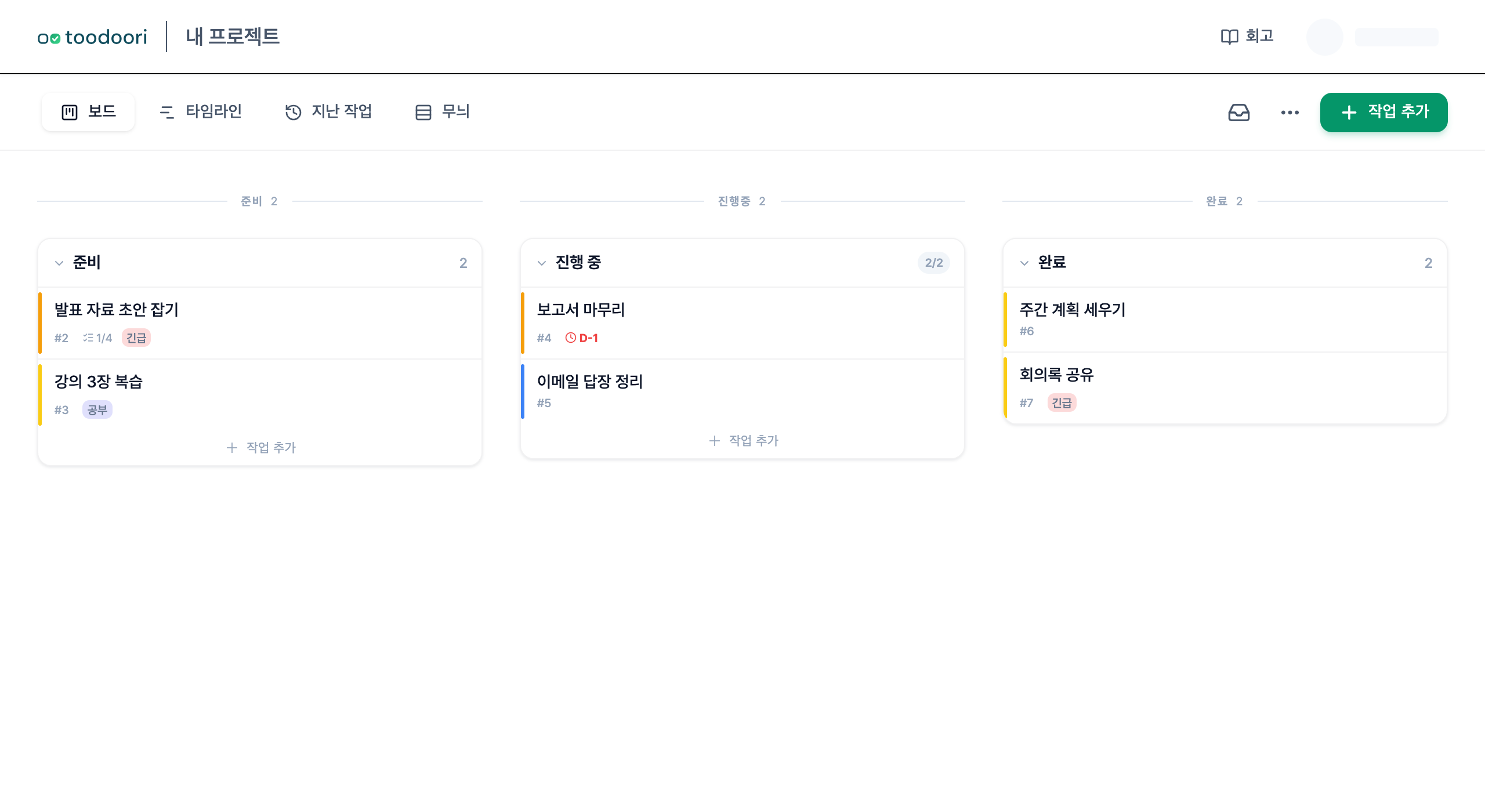
To see for yourself, Getting Started with toodoori gets you to your first board in five minutes.
Next Steps
- Explore the board itself: Kanban Board
- Coming from to-do lists: To-Do List App vs. Kanban App
- Build your first board: Getting Started with toodoori