Kanban Board
A kanban board in toodoori shows task cards in the stages you define. Name the stages to match your work, then move a card when its status changes.
This page covers the board controls. For the underlying method, see What Is Kanban? Understanding the Kanban Board.
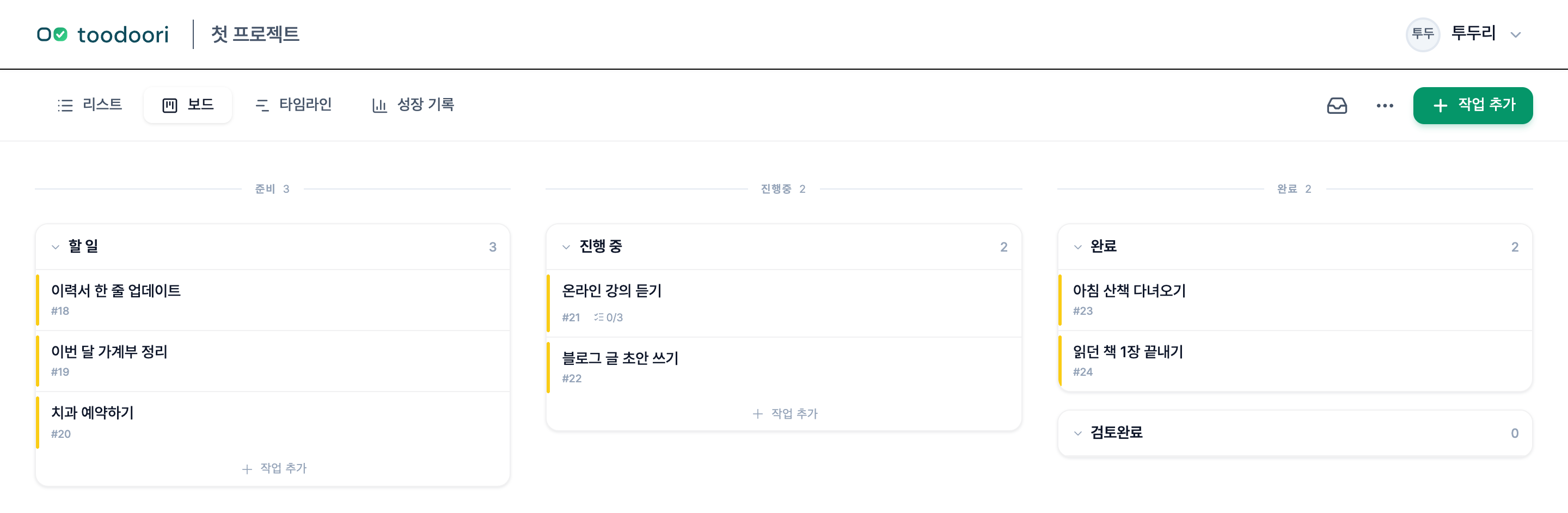
Groups and stages
The board uses fixed workflow groups: Inbox, Planning, In Progress, and Finished. The Inbox collects tasks before you organize them. Within Planning, In Progress, and Finished, you can name stages for the states you want to track.
For a small personal project, one stage in each of those three groups is enough: Ready, Doing, and Done. For other layouts, see 5 Personal Kanban Board Examples.
Name your stages
Start with an existing project open on its board.
- Open Project Settings, then select Stages. The Stage Management section shows stages grouped under Planning, In Progress, and Finished.
- In Planning, edit a stage’s name to
Ready. - In In Progress, edit a stage’s name to
Doing. - In Finished, edit a stage’s name to
Done. - Select Save. The names are saved for this project.
- Return to the board and check that the three stage names appear.
To add another stage, select Add Stage under the group where it belongs, enter a distinct name, and select Save. Drag stages within their group to change their order, then save the change.
Create and move your first card
- On the board, select Add Task in the
Readystage. - Enter
Draft the project introductionas the title, then press Enter or select Add. Its card appears inReady. - Press Esc to close the empty input.
- Drag the card into
Doingwhen you start writing. - Open the card to add any details you need. Task Cards covers content, checklists, and the other tools.
- When the introduction is written and checked, drag the card into
Done.
Keep each move tied to a real change in the task. Moving the card records its state; it does not perform the work for you.
Limit work in progress
You can set a work in progress (WIP) limit on stages in the In Progress group. See Managing Flow for the settings. WIP Limits: Choosing What to Start and What to Defer explains how to use a limit when choosing your next task.
Choose the task scope and view
Choose Today, Unfinished, or All in Board navigation to set which tasks appear. Subprojects and saved filters narrow that scope further.
Use the tabs above the board to change the view:
- Board: cards arranged by stage.
- Timeline: tasks shown by their start and due dates.
- Past Work: completed tasks and related records for a chosen period.
Today includes unfinished tasks due today or earlier, plus tasks you choose manually. Choosing a task for Today leaves its stage unchanged. See Today: Choose Your Daily Tasks for selection and reviewing yesterday’s work.
Next steps
For the complete first-use walkthrough, read Getting Started with toodoori. Make It Yours covers display settings, and Past Work and Archive explains where to find completed work.