Organizing & Finding
Use subprojects to group related tasks and saved filters to show tasks that match label or priority conditions. Both work with the Today, Unfinished, and All scopes, so you can narrow your view without changing task stages.
Labels
Attach colored labels such as “Study,” “Home,” or “Review” to classify a task. A task can have several labels. Manage the available labels under Labels in project settings, then assign them in task details.
Labels describe the task. A saved filter uses those labels to decide whether the task appears in the current view.
Saved filters
A saved filter stores label and priority conditions under a name. For example, save “Review priorities” with a Review label and the High and Highest priorities.
Select or clear a filter
- Open Saved filters in Board navigation.
- Select a filter name to apply its conditions to the current view.
- Select No filter to remove those conditions.
The navigation search, Search projects & filters, helps you find saved filters and subprojects. It does not search task titles. In the Today selection editor, use Search tasks to search the candidate tasks themselves.
Choosing a filter in the navigation applies it to the current view. Open Manage filters to access the filter list. Pin a filter there to make it the project’s default. Remove its pin to clear that default. No filter clears the current view without deleting the saved filter or its default setting.
Create and edit conditions
From the filter list, select Manage Filters to open the Filters section of project settings. Add a filter, give it a name, choose at least one label or priority, and save. Select an existing filter to edit its name or conditions. Use its delete control to remove it.
Conditions combine as follows:
- If you choose several labels, a labeled task matches when it has at least one of them.
- Tasks with no labels pass the label condition. Any selected priority condition still applies.
- If you choose several priorities, a task matches when its priority is one of them.
- If you set both labels and priorities, the task must pass both conditions.
- Leaving labels or priorities empty leaves that condition unrestricted.
For the “Review priorities” example, a task labeled Review with High priority appears. A task labeled Home without Review does not. An unlabeled task with High priority also appears. A task with Low priority does not pass the priority condition.
Saved filters offer label and priority conditions. A filter name such as “This week” does not add a date condition. Use the Today guide for due-date inclusion and daily selection.
Subprojects
A subproject groups tasks that belong to the same effort within a project. For example, keep “Website refresh” and “Newsletter launch” on one board while viewing either group on its own. Assign a task through the subproject field in task details.
A subproject records which effort a task belongs to. A saved filter checks the task’s properties. Selecting “Website refresh” and a High-priority filter shows matching tasks within that subproject. Selecting Today narrows the result again to tasks included today.
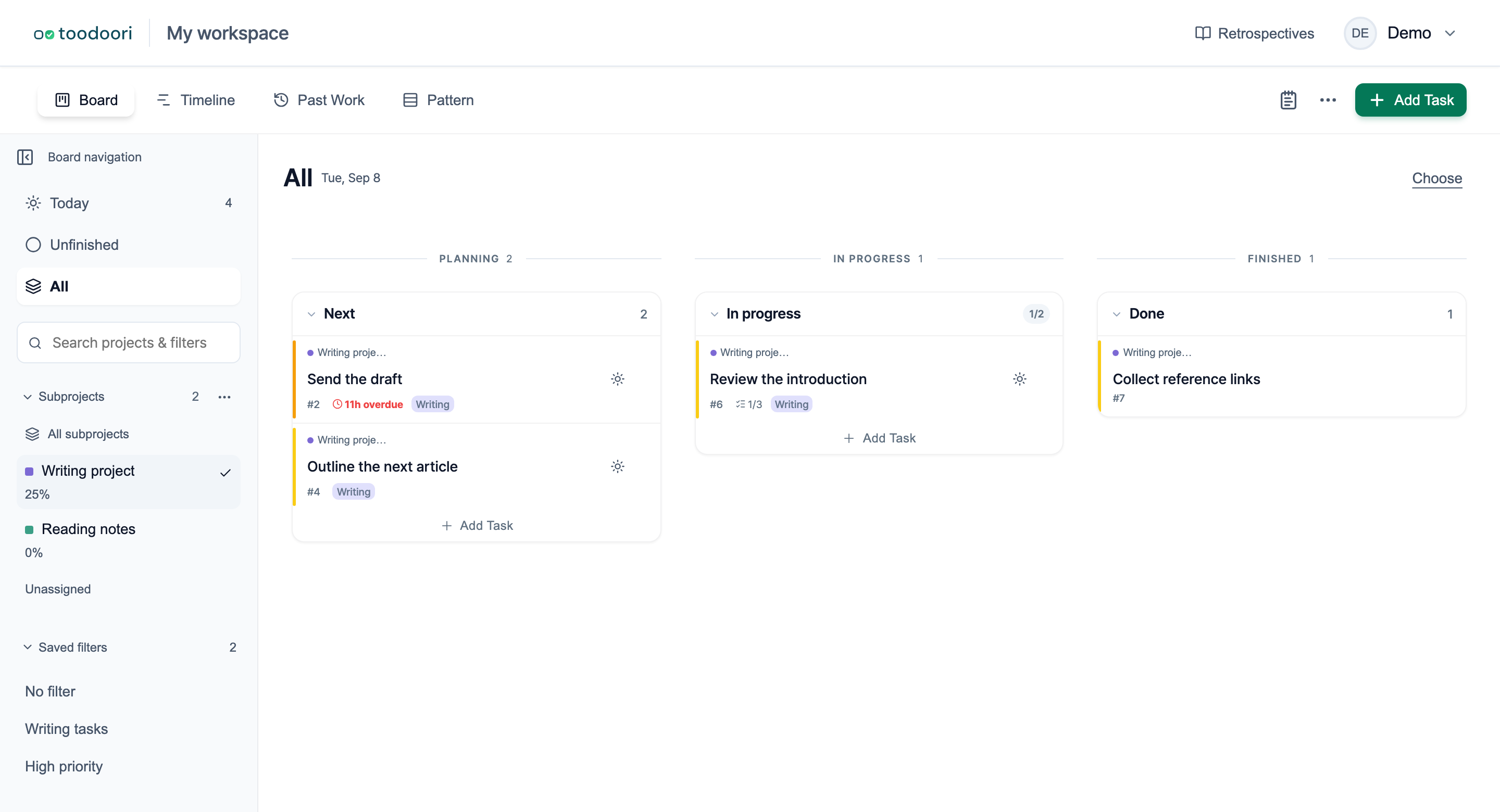
Browse subprojects in the navigation
The Subprojects list starts collapsed and shows the current selection. Expand its heading to browse the list. Each entry has a color mark and name. Expanded entries show progress when available and a status label when the subproject is not active, such as Paused or Completed.
Selecting a name narrows the board to that subproject. Choose All subprojects to remove the membership restriction. Choose Unassigned to see tasks with no subproject.
Use Search projects & filters to narrow a long list. Searching expands the matching navigation sections. Archived subprojects are normally omitted from the navigation list; a currently selected archived subproject can remain visible.
Manage a subproject and open its details
Select the three-dot Manage sub-projects control beside the Subprojects heading to browse the management list or create a subproject. The list groups entries by status. Its completed group starts collapsed unless it contains the current selection. Archived subprojects are available through the Archive link when present.
After selecting a subproject, open Sub-project details in the navigation. Its detail page brings together the description, notes, tasks, dates, status, and progress. Use the status control for Active, Paused, or Completed. The detail page also provides archive and restore actions.
A subproject’s progress covers its tasks as a whole. Changing the task scope or saved filter changes which tasks appear on the board; it does not change the subproject’s progress.
Sorting
Set task sorting in project settings to control card order within each stage. Available fields include priority, due date, entry date, and task number. Choose a direction for each rule and reorder rules when one should take precedence.
Sorting changes the order of the tasks that remain after the current scope, subproject, and saved filter have been applied.
Worth reading next
- Today: Choose Your Daily Tasks: combine daily selection with subprojects and filters.
- Task Cards: edit a task’s labels, priority, due date, and subproject.
- Automation: apply label and priority changes through rules.
- Getting Started with toodoori: create tasks and move them through the board.