Freelance Project Management: Track Work and Client Replies
To manage multiple client projects, keep each task tied to its project and distinguish work you can do from work waiting for a reply. Record the next agreed deadline, the latest revision request, and your next action where you can find them together.
Start with your current project list, agreed deliverables, and recent client messages. The method below is for your own working records. It uses a fictional cafe menu, studio website, and newsletter design to show how to switch projects without losing the next action.
What to record for each project
Copy this blank template for each piece of work that needs its own progress state. Keep a link or document name beside the agreement so you can return to the source.
Project:
Task:
Agreed deliverable and source:
Next agreed deadline, or not set:
Current status:
Waiting for:
Next action or check:
Latest revision request and date:
Where to find the current file:
Use concrete task names such as “Revise the website contact section.” A project name alone does not tell you what to do when you open it again.
For status, start with Ready, In progress, Waiting for a reply, and Done. Use Waiting for a reply when a specific response prevents your next action. If you have simply chosen to work on another project first, leave the task in Ready.
An example with three projects
These fictional records describe three separate client projects on Monday, October 12.
Cafe menu: awaiting proof feedback
You have sent a menu proof and are waiting for the client’s reply. Record the file you sent, the send date, and the response you need: feedback on the menu prices and wording.
The next delivery date is not set. Your next check is Thursday. That check is your own reminder to review the conversation; it is not a deadline you have assigned to the client.
Studio website: revising the contact section
The client has asked you to change the contact button’s text and make the button wider on mobile. You agreed to send the revised page on Wednesday. The task is In progress, and the next action is to confirm the final button text before updating the draft.
Keep the request with the task so you can check the revision against the client’s actual words. After editing, check the button at phone width and record which draft you sent.
Newsletter design: final file delivered
You have sent the agreed final design file and recorded its filename. The delivery task is Done because the agreed result for that task was sending the file.
If a later request arrives, record what changed before deciding how to handle it. The new request does not erase the earlier delivery record.
Handle waiting work and revision requests
For waiting work, write what you need before you move the task to Waiting for a reply. “Waiting” is too vague to act on. “Waiting for feedback on the menu prices and wording” tells you what to look for in the next message.
For a revision, keep a dated note that separates the request from your next action. A note for the studio website might read:
Received: October 12, 2026
Request: change the contact button's text and make it wider on mobile.
Existing scope: revise the contact section's text and layout.
Needs confirmation: the final button text.
Next action: confirm the text, then update the mobile layout.
Agreed handoff: revised page on Wednesday, October 14.
If a request adds work beyond what you agreed, record the open question before changing the plan. Keep the current deadline visible while you confirm the new scope and timing. This is a working record, not a substitute for the agreement with the client.
Review the board at the start of the day
- Read the next agreed deadline for each active project. A project waiting for a reply can still have a delivery approaching.
- Check replies that could release waiting work. When the menu feedback arrives, record it and choose the next action before changing the stage.
- Choose work you can do now. For the website revision, confirm the final button text before changing the draft. Select the task you intend to work on today.
- Leave a note before switching projects. Record the current file and the next action. You should be able to resume without rereading the entire message history.
After this review, each active project should have either an available next action or a named response you are waiting for. Check that any dates marked as deadlines came from an agreement.
An example in toodoori
Create subprojects for Cafe menu, Studio website, and Newsletter design within one project. Assign each task to its subproject, then use stages to describe its progress. The subproject identifies the work; the stage shows its current state.
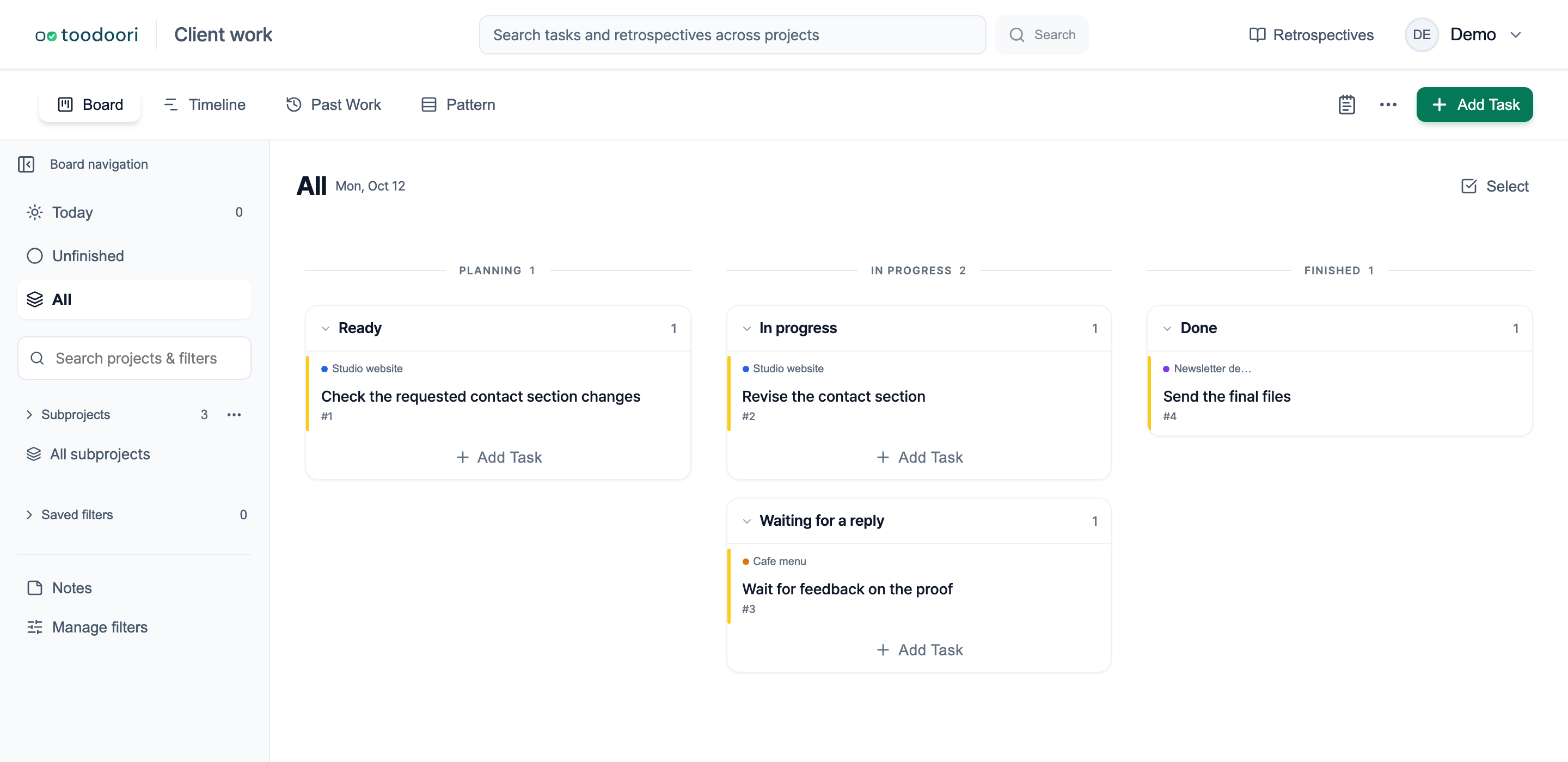
The screenshot uses fictional client work. You can view all subprojects together or select one to narrow the board. See Organizing & Finding for those controls and Task Cards for keeping revision notes with a task.