Decision Log for AI Collaboration: Human-in-the-Loop Tasks
To keep a decision log when you work with an AI, have it create a task for each decision it needs from you, instead of asking in chat. This is a human-in-the-loop step: the AI stops at the decision and waits for you. The task title starts with “[Review needed]”, and the body holds the request, the AI’s recommendation, whether the decision can be reversed, and lettered options. You answer in a note and move the task to Done yourself. The question, your answer, and the AI’s note about what it applied stay in one task.
This post uses the same customer survey report example as Track AI Agent Work on a Board and Relations Map. The AI app is Claude, connected to toodoori with Read and write access. The AI needs that access to create tasks and notes. To connect an AI app, see Connect toodoori to ChatGPT and Claude with MCP.
Asking in chat versus creating a task
When an AI asks “A or B?” in the middle of a chat, it’s easy to answer on the spot. But there are a few drawbacks.
- As the chat grows, the question and your answer scroll out of view and get hard to find again.
- A short question doesn’t show what each option would change.
- A decision you can’t make right away gets put off, and only the chat shows that it’s still open.
- In a new chat, you have to explain what you decided all over again.
If the AI creates a task for the same question, the task sits in To do, so it shows up as something you still need to handle. The body has room for the options and the reasoning. Your answer goes in the same task’s notes, and in a new chat the AI can just read the task. For how to continue from a task’s record in a new chat, see Continue an AI Chat Without Starting Over.
For why it helps to keep your to-dos and their records in one place when you work with AI, see Task Management with AI: Why One Task List Helps.
Keep your work with the AI in one sub-project
In the example, this is the “Customer survey report” sub-project inside a project called “Work”. You can use a whole project instead.
Two kinds of tasks end up in the sub-project.
- Work the AI carries out: these tasks move from In progress to Ready for review, the stage where you check what the AI finished. The rules for moving tasks between stages are in Track AI Agent Work on a Board and Relations Map.
- Review requests, where the AI needs a decision from you: the title starts with “[Review needed]”, and the task waits in To do until you answer.
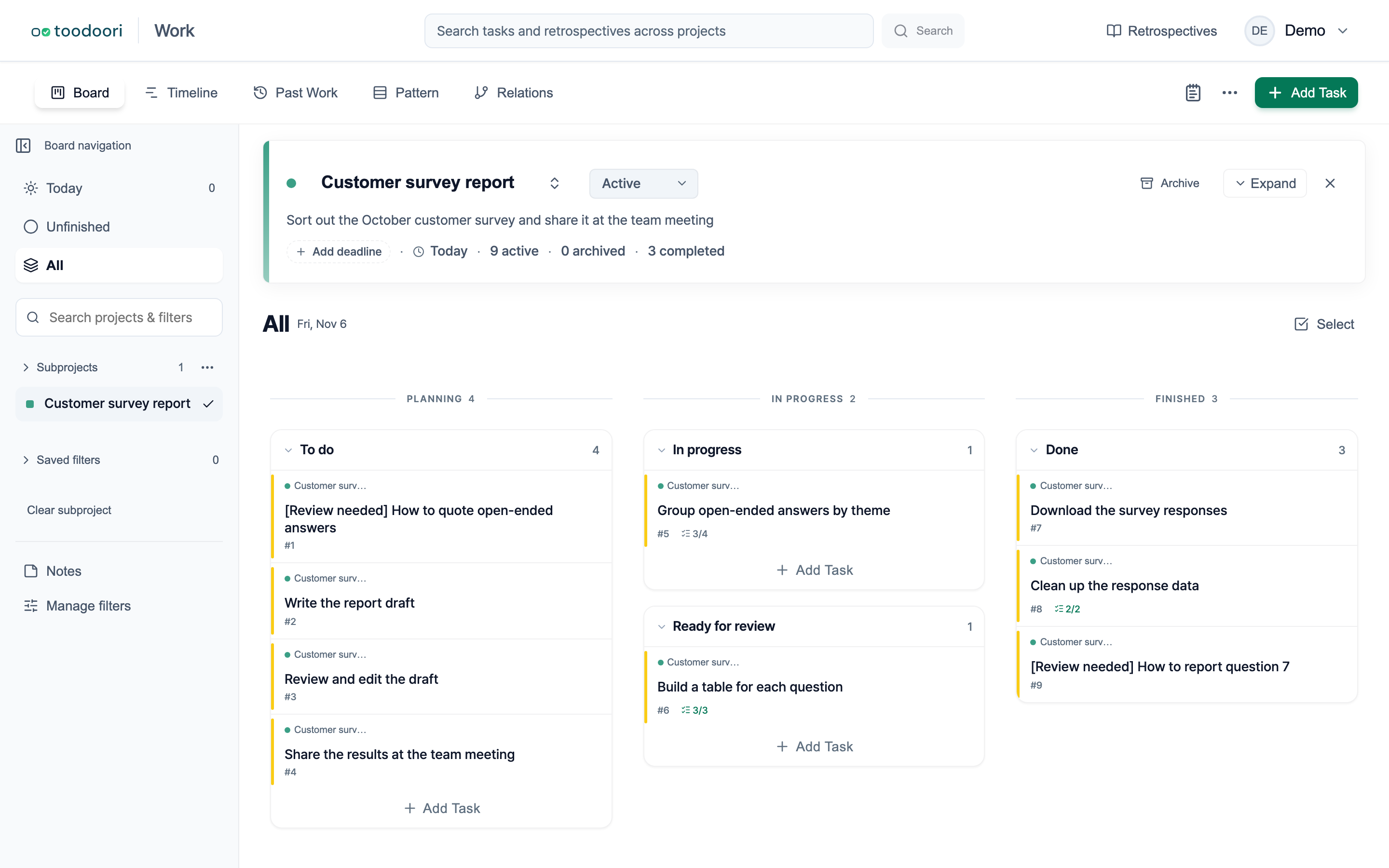
The “[Review needed]” prefix is just a convention for telling these tasks apart. With it in the title, you can use the Title condition in a saved filter to gather only the review requests. If you prefer, you can also ask the AI to add a “Review needed” label.
Tell the AI how to create a review request
At the start of the chat, give it these rules.
In this sub-project, when I need to make a decision, don't ask me in chat. Create a task for it.

- Start the title with "[Review needed]" and say what needs deciding. Put it in the "To do" stage.
- Keep each task to one topic. Put questions on the same topic together, and create a separate task for each unrelated decision.
- At the top of the body, write three items in a line or two each: "Request", "Recommendation", and "Reversible". Under "Reversible", say whether the decision is easy to reverse after I make it.
- Label the options (A), (B), and (C). For each one, say what changes if I pick it and what problem remains.
- Say why you recommend it, but I'm the one who decides. Wait for my answer even if you have a recommendation.
- At the end of the body, tell me how to answer: "Write your answer in this task's notes, then let me know."
- While you wait for my answer, work on things that don't depend on this decision.
- Don't move a review request to Done. I'll answer and move it myself.
With the request, the recommendation, and the reversibility at the top, you can tell what kind of decision it is as soon as you open the task. If it’s hard to reverse, read the options closely. If it’s easy to reverse, you can go with your first choice and change it later if needed. The AI recommends but waits for your answer, so the decision stays yours.
Example: a review request the AI created
Below is “[Review needed] How to quote open-ended answers”, created by the AI. It asks how the report draft should handle respondents’ open-ended answers.
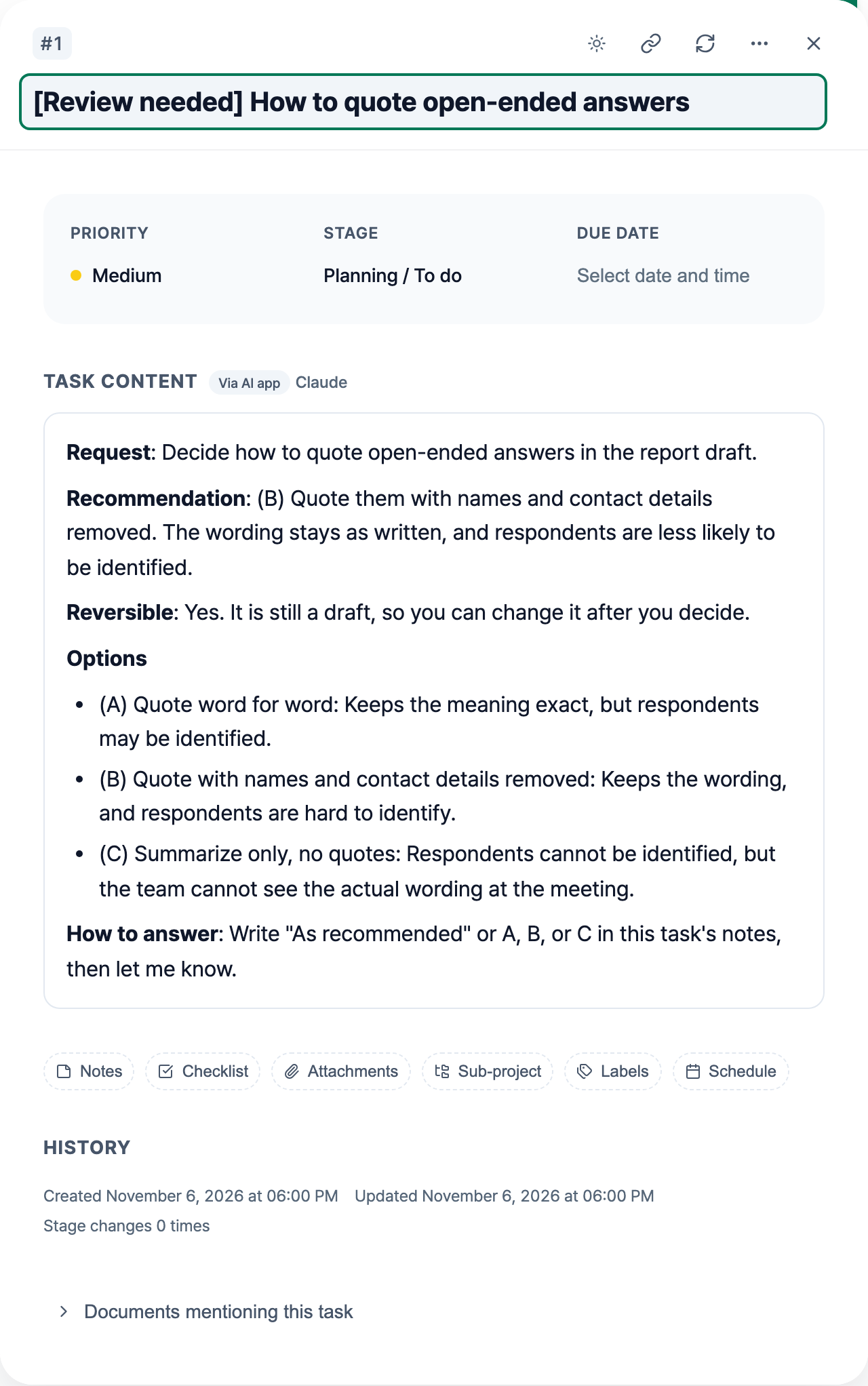
The body is organized like this.
- Request: what you’re being asked to decide
- Recommendation: the option the AI would pick, and why. It’s a suggestion, and you decide whether to follow it.
- Reversible: whether it’s easy to change after you decide
- Options: what changes with each one, and what problem remains
- How to answer: where and how to reply
If the body is hard to follow, ask the AI to rewrite it more simply. If you also ask it to leave a note saying what it changed and why, the task keeps a record of why the body changed.
Answer in a note, then move it to Done
-
Open the task and read the body.
-
Write your answer in a note. There’s no required format. If you agree with the recommendation, “As recommended” is enough. With several questions, something like “1-A, 2-B” works. You can also write an answer that isn’t one of the options. A line of reasoning helps you remember later why you decided that way.
-
Tell the AI in chat that you’ve added your answer. An AI app reads tasks during the chat, so it won’t see the note until you tell it.
I answered the "How to quote open-ended answers" task. Read the note and apply it. Then leave a note on that task about what you applied. -
When you’ve finished deciding, move the task to the Done stage yourself. Here, Done means you’ve made your decision, so you don’t need to wait for the AI’s note. The AI can add its record of what it applied to the same task after you move it to Done. Completed tasks stay in Past Work.
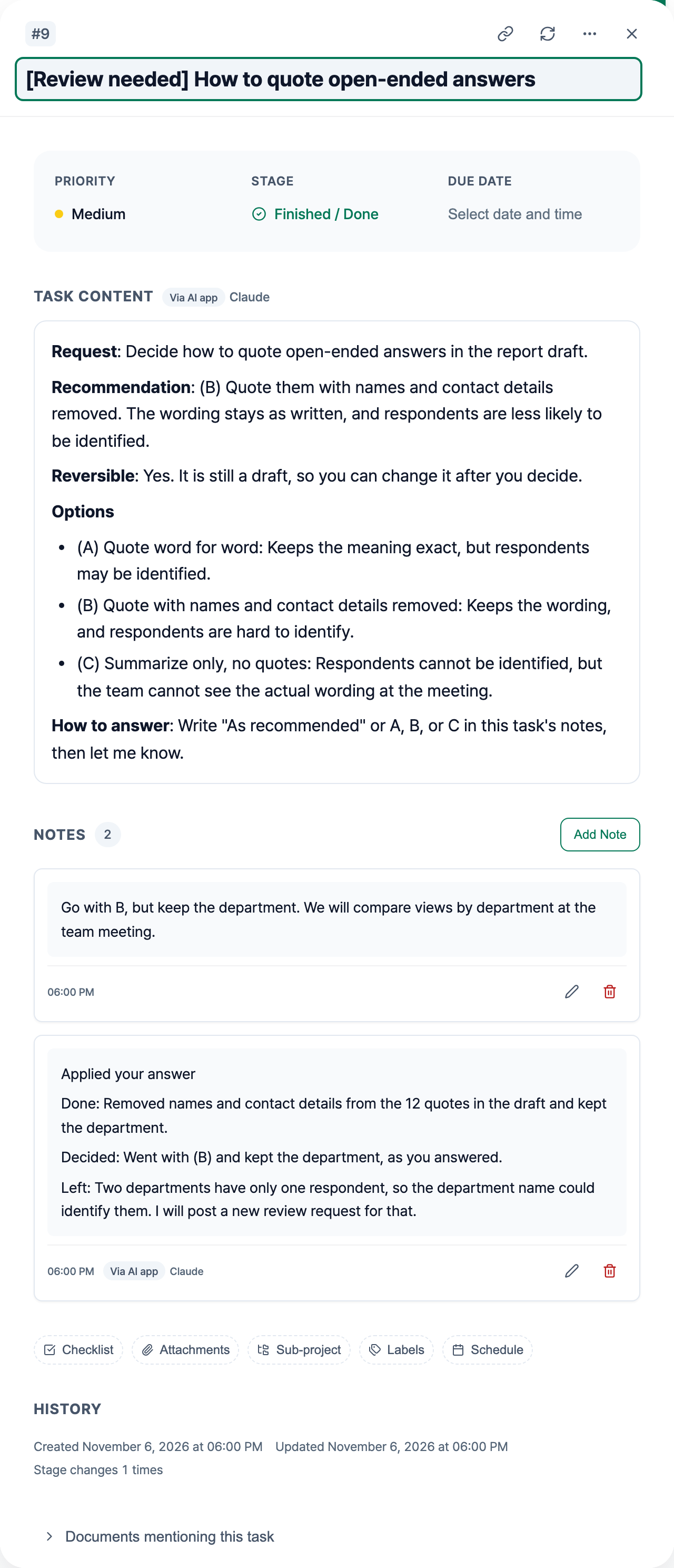
In the example, you picked option B but asked to keep the department. That condition wasn’t among the options, so you added the reason too: the team will compare views by department at the meeting. After applying your answer, Claude left a note with what it did, what was decided, and what’s left. Under “Decided”, the note records that B was applied and the department was kept, as you answered. Notes from an AI app carry a label, so you can tell your answer from the AI’s record of applying it. For how the labels work, see Telling AI-written notes apart from your own.
If something under “Left” needs another decision from you, have the AI create a new review request for it. In the example, two departments have only one respondent, so a department name could identify them.
Find a past decision later
When you wonder “why did I decide that?” months later, open the task for that decision. It holds what was asked, with the options and the AI’s recommendation; your answer and your reason; and what the AI applied and what’s left. You can find it by its title instead of searching a chat log by date or conversation.
- Search for “Review needed” in the task list on the sub-project’s detail page to see only the review requests. Search and filters are covered in Organizing & Finding.
- You can find completed review requests in Past Work and Archive.
- You can link a review request as Related to the tasks the decision affects. Then you can see in the task details which work came out of which decision. In the example, you could link it to the report draft task. A link only records the connection and never blocks progress. See Task Relations: Dependencies and Linked Tasks for details.
Tips for working this way
- Keep one topic per task. Unrelated decisions in one task share a single Done and a single record, so you can’t move one to Done without the other.
- To change a decision you’ve already moved to Done, don’t edit that task. Create a new review request and link it to the old one as Related. Then both the earlier decision and the new one stay on record.
Worth reading next
- Tracking step-by-step work on the board and relations map: Track AI Agent Work on a Board and Relations Map
- Continuing from a task’s record in a new chat: Continue an AI Chat Without Starting Over
- Connecting an AI app: Connect toodoori to ChatGPT and Claude with MCP