Task Management with AI: Why One Task List Helps
When you work with artificial intelligence (AI), keeping your tasks and their status in one place helps you see what remains. Notes on each task can record what you and the AI did, the decisions you made, and the checks still needed. That makes it easier to resume when a finished AI response leaves more work to do.
Source material can stay where you use it
Imagine you are preparing a blog post. You collect ideas in Notion, keep research notes in Obsidian, and put a reminder to review the draft on a sticky note. Each place serves a purpose. But when you return to the post, you have to look in several places to work out what remains.
The source materials can stay in those tools. One task list can hold the actions you intend to take and their current status. A task called “Publish the blog post” might link to the idea and research notes, with a checklist for drafting, reviewing, and publishing.
You still open Obsidian to read your research. You open the task list to decide what to work on. Keeping that distinction makes the list useful without moving all your writing and notes into it.
A finished draft still has a next step
Now suppose an AI app writes the first draft. The conversation ends with a complete article, but you have yet to read it. “Draft complete; review pending” describes the situation more accurately than marking the publishing task done.
A draft may still contain a claim you want to check or a conclusion you want to change. Keeping those actions visible gives you somewhere specific to start.
The division of work can change during the task. You might rewrite a section, then ask the AI to check whether it still matches the outline. The status needs to follow the work that actually happened.
Record what changed and who did it
A status tells you where the post stands. Short notes explain how it got there.
In this example, the post explains how to manage tasks with AI. You choose blog publishing as an example for readers who keep tasks in several places. The AI writes a draft based on that choice and notes that two cited sources still need checking. You review the opening, revise the example, and leave the source checks for your next review.
Those are useful details to keep beside the task: your choice, the AI’s draft, the changes you made, and what remains. A note saying “Reviewed” leaves too much open. “I reviewed the opening and changed the example; two sources still need checking” gives you a clear place to resume.
Knowing who did each part also helps you read the record. You can distinguish an AI’s suggested change from a change you made, or a check it reported from one you performed. The notes describe specific actions without assuming a fixed role for either participant.
Keep enough to resume and look back
When you return to the publishing task, the next action is already clear: check the two original sources. The draft and research notes remain available through their links. A short account of the relevant choices and checks is enough to explain the current status; the full conversation can stay elsewhere.
After publishing, those same notes let you revisit your own decisions. You can see which readers you had in mind and how you revised the example. If you later update the article, you can decide whether those choices still fit.
In toodoori, task checklists can show the remaining actions, and task notes can hold these decisions and checks. Notes written through a connected AI app carry an authorship label with the app’s name. Telling AI-written notes apart from your own explains how those labels work.
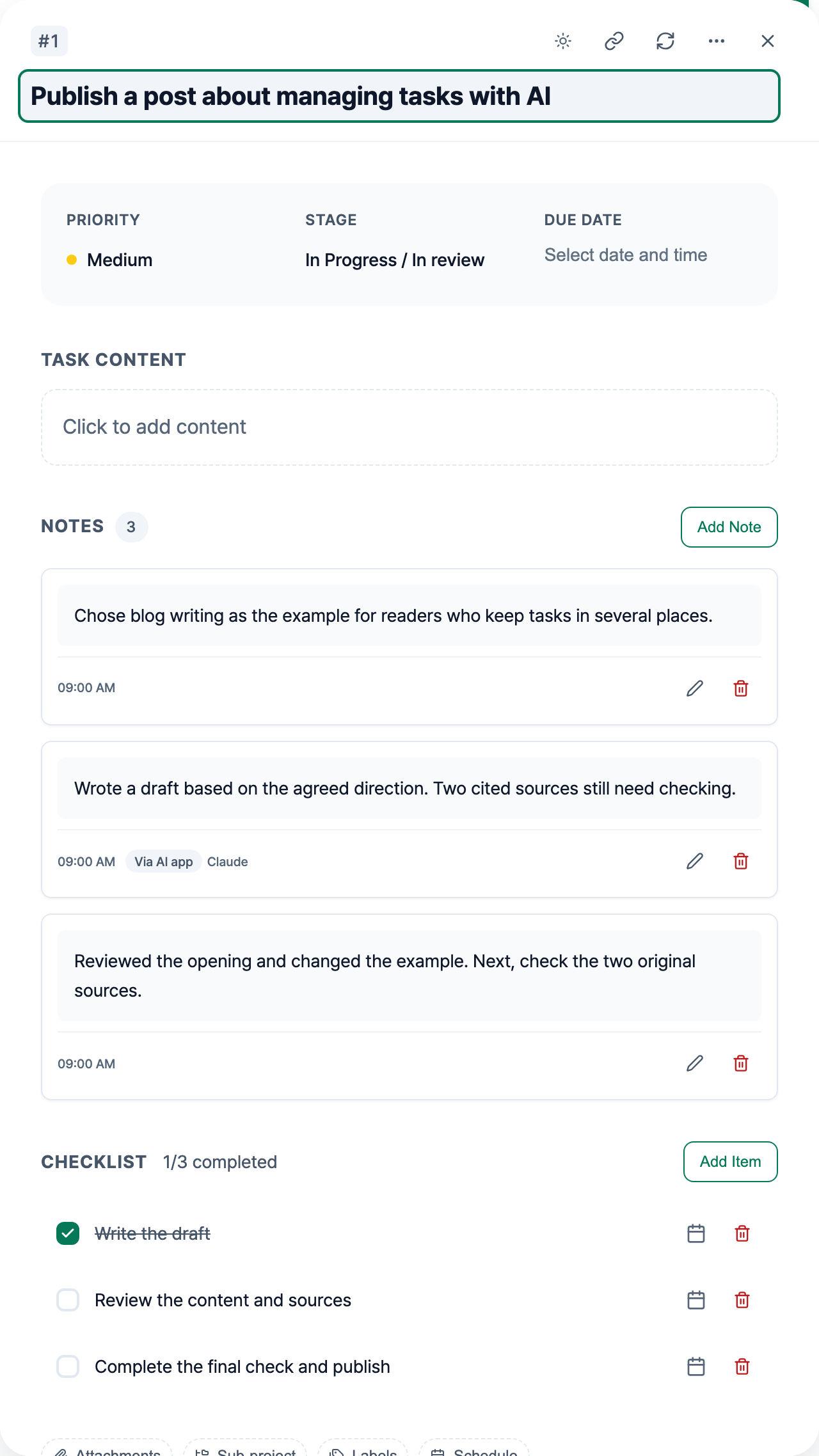
The screenshot uses example data created for this article.
Related Reading
- Where to keep the notes from working with AI
- Connect an AI app using the Model Context Protocol (MCP): Connect toodoori to ChatGPT and Claude with MCP