Where to keep the notes from working with AI
If you spent hours with an AI tracking down a root cause, then hit a similar problem days later and started asking from scratch, the issue is that there was no place to keep it. This post covers how to attach the conclusions you reached with AI as a markdown file, and how to pull them back out of the archive after the work is done.
If the conversation has produced work you have not started yet, Turn AI Chat into Tasks: A Worked Example covers reviewing task candidates before adding them to your board. This article covers the conclusions you keep after doing the work.
The conversation stays, but the conclusions scatter
When you work with AI, the chat log is stored somewhere. The problem is that the log is too long to reread. Every assumption you made, overturned, and remade is in there, so finding the three lines that matter means scrolling for a while.
Days later you do not need the whole conversation. You need:
- What the cause was
- How it was fixed
- Which code you touched
Unless you write those three down while the conversation is still fresh, you will dig through the same problem again next time.
Attach the conclusion to the task
In toodoori you can attach files to any task. When a session with AI ends, upload a markdown (.md) file holding just the conclusions to that task.
Markdown works well here:
- It is plain text, so it stays light and opens in any editor later
- Code blocks and lists carry over as they are
- A mermaid diagram renders as an actual picture in the preview
toodoori reads attached markdown in place, without downloading it. There is no step where you save the file and open it in another app, so you can check it while looking at the task.
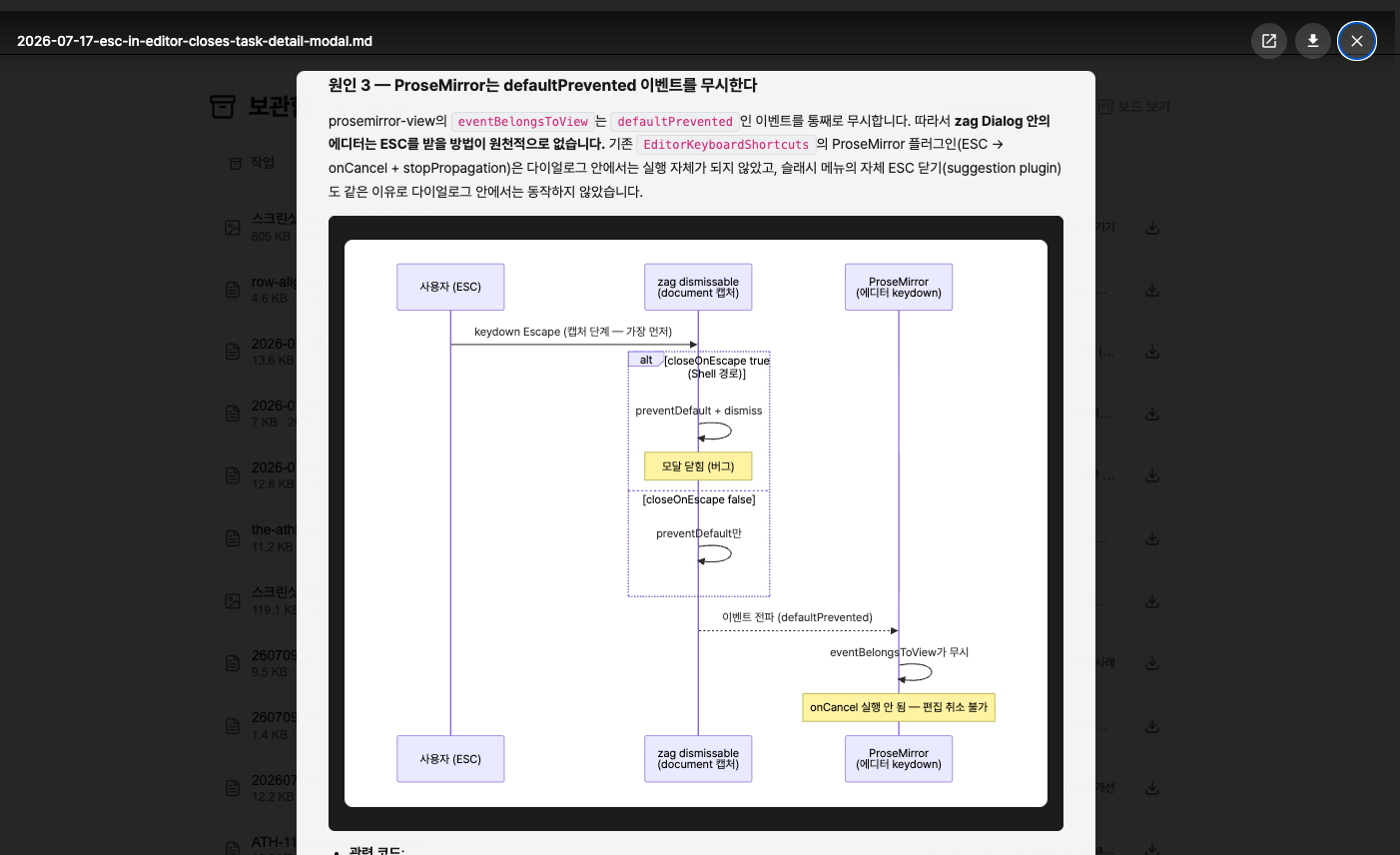
The note above records why the Escape key was closing a modal while the editor had focus. Because the code paths and the sequence diagram sit next to the prose, reading it is enough to get the context back.
You do not have to upload notes by hand either. If you connect an AI tool over MCP, the AI can upload and read attachments itself. Once it has found the cause, you can simply say: put what you just summarized on this task as a markdown file.
Finishing the task does not remove the record
This is where the archive earns its place.
Archiving a completed task clears your board, but the attachments on that task stay. The archive has three sections: tasks, sub-projects, and attachments. The attachments section gathers every file from your archived tasks in one list, newest first.
That gives you two ways back to a note:
- By task, when you remember what the work was. Open it in the archive and the attachment is right there
- By file, when you have forgotten the task but remember the note exists. Scan the filenames in the attachments list
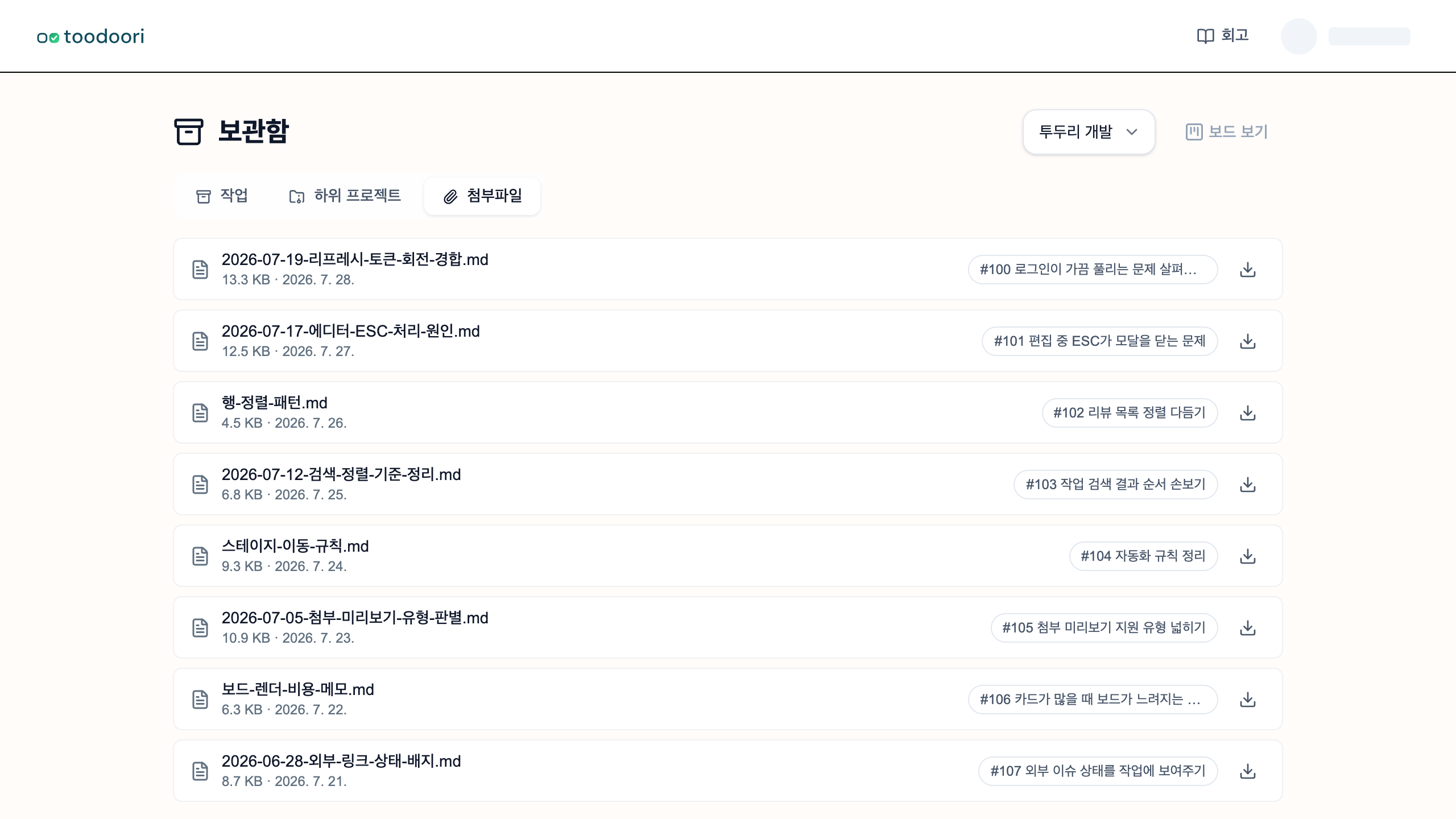
The second route comes up more often than you would expect. You may not recall the title of something from six months ago, but a filename like 2026-07-19-refresh-token-rotation-race.md stands out in a list. For the rest of the archive, see Looking back.
What these notes do for you
You do not solve the same problem twice
AI does not remember your previous session. But if the conclusion is in a file, you can hand that file over as context the next time you ask. A conversation that starts from last time’s findings goes deeper than one starting from nothing.
The reasoning stays
Code keeps only the result. Why you chose this approach, and which alternative you rejected and why, rarely fits in a commit message. When that reasoning sits next to the task, reopening the code months later does not mean re-convincing yourself from zero.
Writing it filters what is worth keeping
To leave a note you have to summarize the conversation once. That summary is the learning. If you cannot state the cause in one sentence, you do not understand it yet, and that is the moment to ask again. Writing the note becomes the place where you check your own understanding.
Making notes worth rereading
A few habits keep a note readable half a year later.
- Put the date and topic in the filename. Something like
2026-07-19-refresh-token-rotation-race.mdcatches your eye when scanning a list - Lead with the conclusion. Cause, fix, where it lives. Keep only as much of the process as you need
- Do not paste the conversation. Keep what you would actually reread. The full log already exists elsewhere
- Drop the date for reusable patterns. If it is a rule you will keep applying rather than one incident,
row-alignment-pattern.mdis easier to find later
A place that fits working with AI
The more you work with AI, the more conclusions pile up. Left inside a chat log, they never reach the next conversation. Moved into a separate document tool, they lose the connection to the work that produced them.
Kept beside the task, both survive: what you were doing when you learned it, and what you learned. Archiving the task keeps that link intact, and the file list brings it back when you need it. What you have written becomes the starting point for the next time you stand in the same place.
Keep notes that span several tasks in a separate document, then leave its location in the related task notes. In toodoori, completed tasks remain available through Past Work and Archive.
Related Reading
- Letting an AI read and write your tasks directly: Connecting AI Tools (MCP)
- The archive and past work: Past Work and Archive
- Putting past records to use in the next decision: Weekly Retrospective Questions and a Worked Example