Meeting Notes and Urgent Requests: Capture First
If writing down a meeting note means first deciding which project and which stage it belongs to, you stop before you start. Separating the place where you capture from the place where you sort keeps the moment from slipping away. This post covers three moments that need a fast note, and how to sort what you captured afterwards.
What it costs to choose where a note goes
Count the decisions one task needs and the list is longer than it looks. Which project, which stage, what priority, what due date. Each one is small, but together they add up to “I’ll write it down later”.
So most notes end up in a notes app or on paper. They get written, they never get opened again, and they never turn into work.
You can’t remove the decisions. You can move them later. At the moment of writing, keep one line. Sort it when you have room.
Three moments that need a fast note
1. In the middle of a meeting
Meetings move fast. Stare at your screen long enough to file what was just said and you miss what comes next.
What you need here isn’t a finished task. It’s one line you’ll recognize later. “Recheck the release scope” is enough. Who, what, and why can be added once the meeting ends.
2. When an urgent request lands
Requests usually arrive with information missing. How big it is, whether it beats what you’re already doing, whether it fits today, none of that is easy to judge on the spot.
Trying to pick a stage while the judgment is still open pushes the whole thing back, and the request gets forgotten in the gap. Capture the fact that it arrived, then decide where it goes after you’ve read it properly.
3. When you don’t know what it will become
A link to read, an idea to check later. Some things aren’t work yet and may never be. Putting them straight on the board mixes them with what’s actually moving, and it gets harder to see what you’re doing right now.
Deciding whether something becomes work is also something you can do later. For now, just capture it.
In toodoori, this is the Inbox
The Inbox button at the top right of the board opens what you’ve captured so far next to a field for the next one. Type a title, add it, and you’re done. The body is optional. Enter in the title field moves you to the body, and Cmd (Ctrl) + Enter adds it right away. The same place works on your phone, so you don’t have to open a laptop mid-meeting.
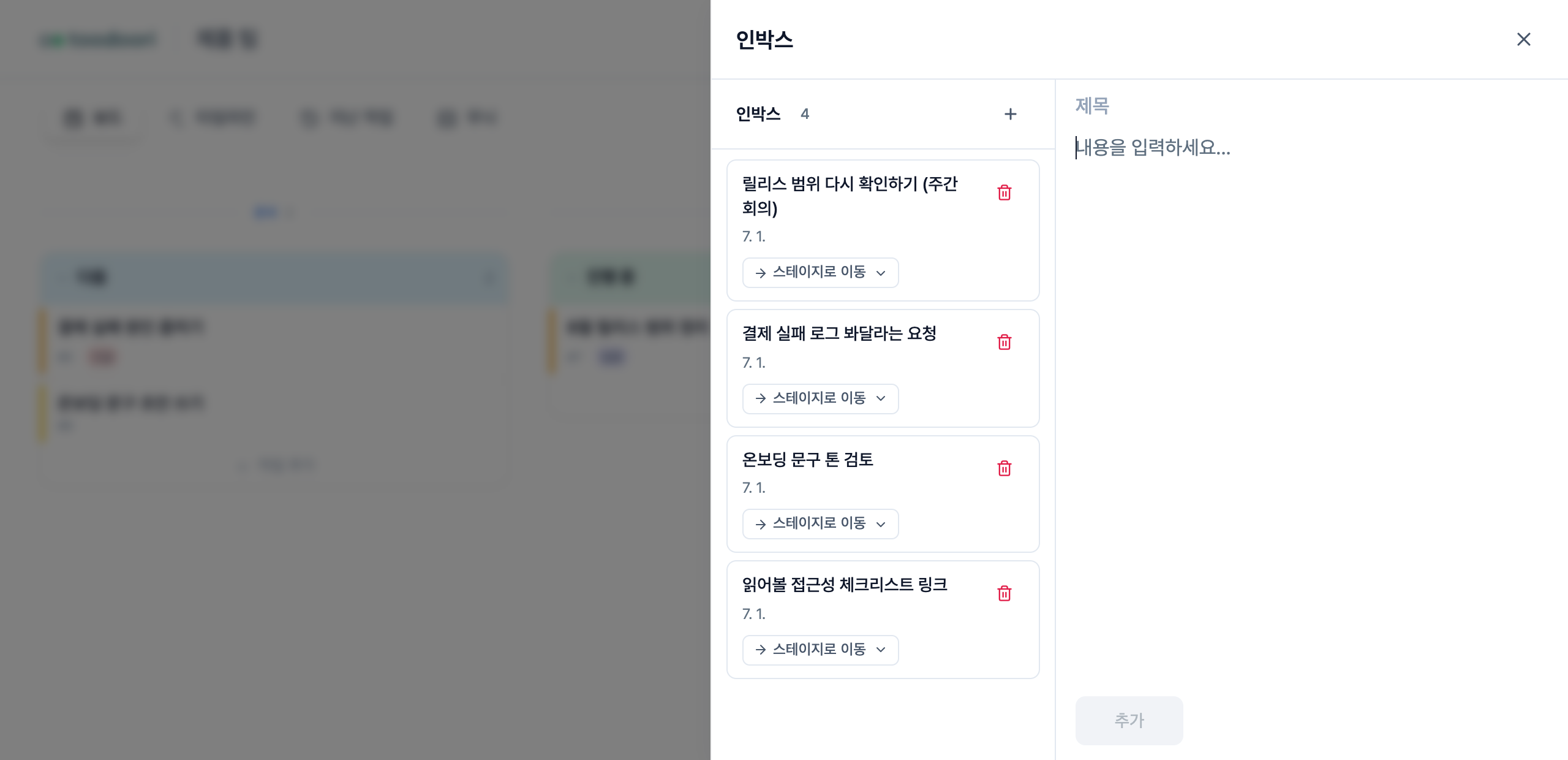
Nothing in the Inbox sits on a board stage. However much you capture, the work already in progress doesn’t get pushed. How the Inbox and the board divide up is covered in Managing Flow.
Sort later, but do sort
Pick a moment to look back at what you captured and the Inbox stops being a place things only accumulate. Right after a meeting ends, or when you close out the day. Attaching it to a habit you already have makes it stick.
Sorting means one of three things.
- If it’s work for now, move it to a stage on the board. Each item has a “Move to stage” control.
- If it’s work for someday, tidy the title so you’ll recognize it and leave it in the Inbox.
- If you’ve decided against it, delete it. You can undo that afterwards.
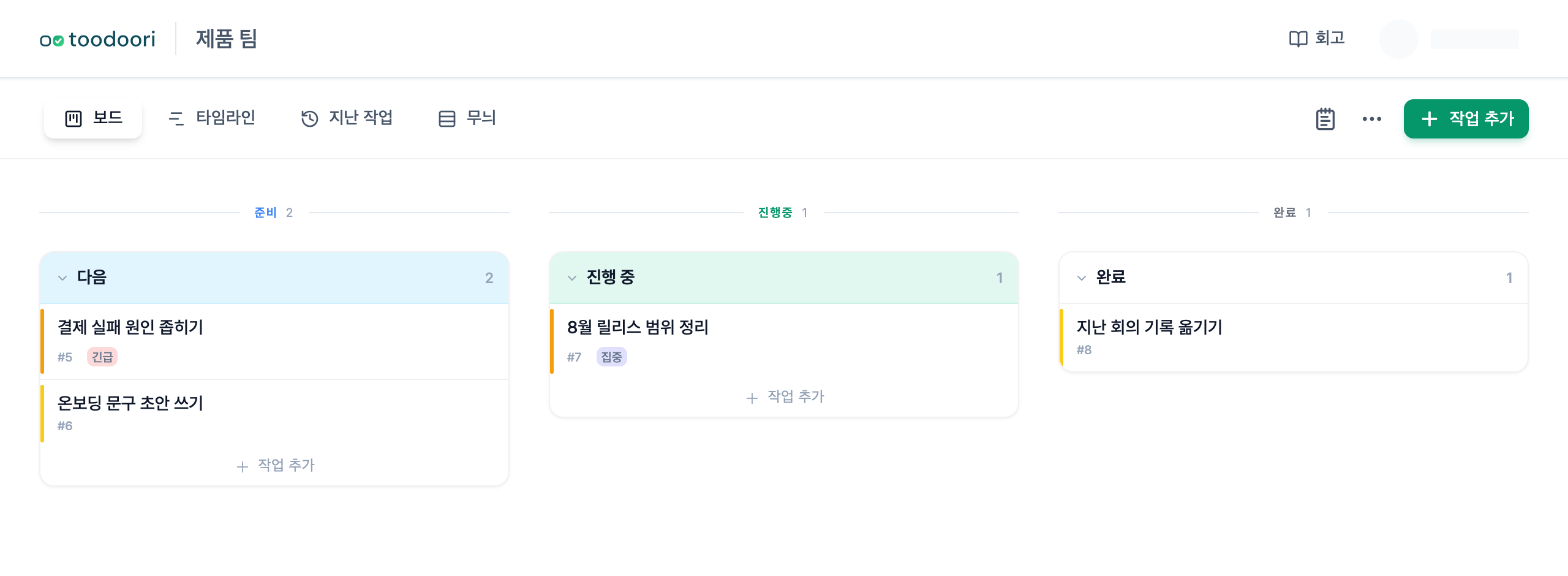
Once something moves, it follows the board’s rules. If you’ve set how many things you handle at once, what you moved won’t pile up again.
Capturing is not postponing
Capturing is a decision to not decide yet. Postponing is leaving it undecided. What separates them is whether there’s a moment you come back.
If the Inbox goes a long time without being emptied, the problem may not be how you capture but that there’s no moment to sort. Once a day, a short pass, is enough. With that one pass in place, you can capture freely in the middle of a meeting or a request.
Related Reading
- How the Inbox and WIP limits work together: Managing Flow
- When captured work only piles up: When Tasks Pile Up: Why Your Flow Gets Stuck
- Sorting on a daily rhythm: Organizing Your Day with Personal Kanban
After the meeting, see Meeting Action Items: Examples and a Follow-Up Template.