Telling AI-written notes apart from your own
When you connect an AI app like Claude to toodoori, it can add notes to your tasks, edit task content, and upload files while you chat. That’s convenient, but as notes pile up it gets hard to tell what you wrote from what the AI put together. So toodoori now adds a small label to anything that comes from an AI app or a personal access token (a key you create in toodoori to connect other tools).
What happened as notes piled up
When you hand work to an AI app, the app leaves notes on what it looked into and how far it got. Some tasks ended up with dozens of notes. When you read them back later, your notes and the AI’s notes were mixed together with nothing to tell them apart. Knowing who wrote what makes it easier to decide where to start reading.
What you see
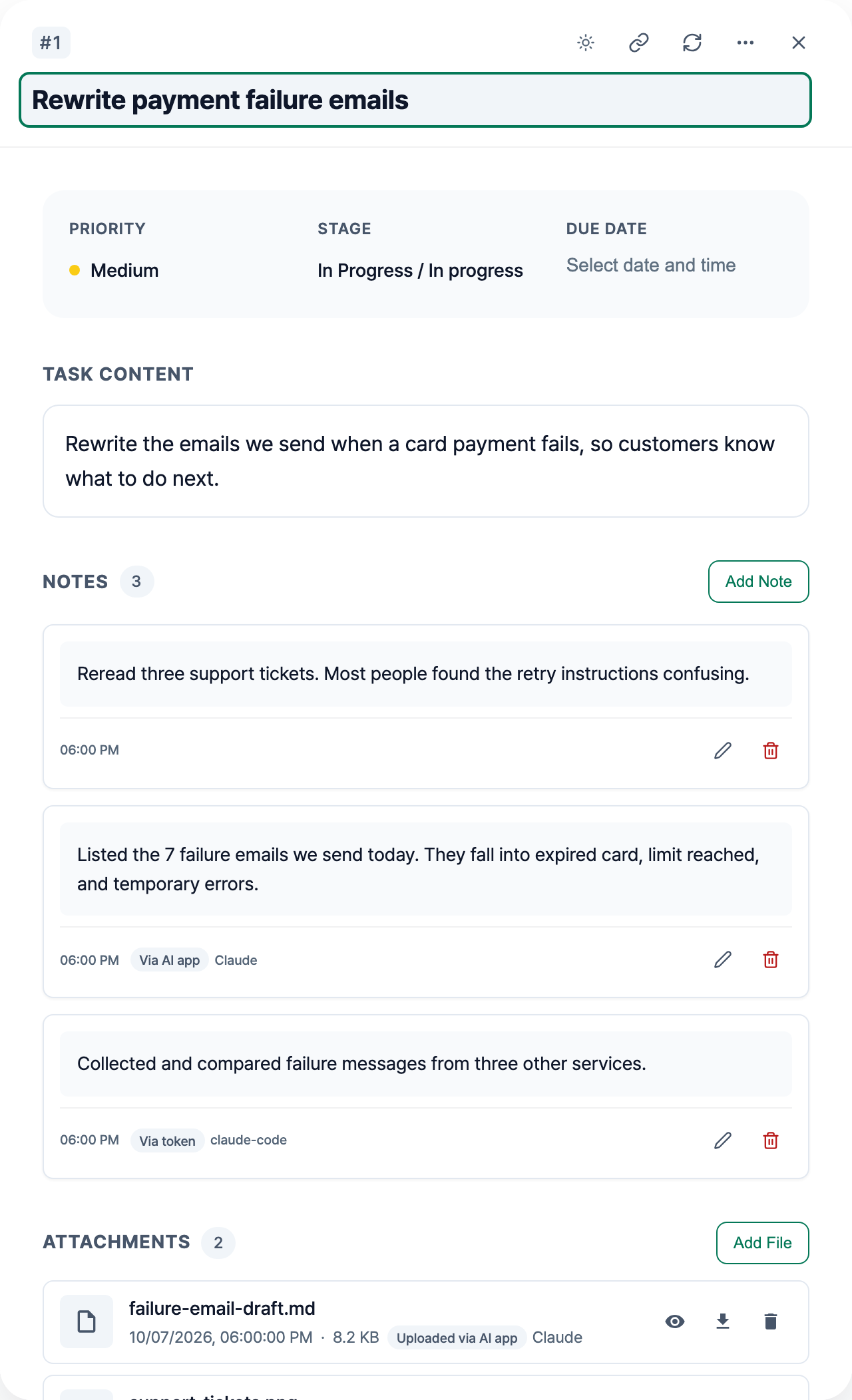
The line under each note shows who wrote it, next to the date.
- Notes written by a connected AI app: Via AI app with the app’s name (for example, Claude)
- Notes written with a personal access token: Via token with the token’s name
- Notes you wrote yourself: no label
The same labels also appear next to the task content heading in task details, next to a retrospective’s creation date, and on sub-project notes. Task content filled in by an automation rule shows Via automation, and attachments show Uploaded via AI app or Uploaded via token.
When a task has many notes, only the three most recent stay open and the rest collapse to one line each. Collapsed notes written through an AI app or a token still show a small label, so you can scan them without opening each one.
The rules we chose
No label on what you wrote
toodoori treats what you keep in it as your own record, so a label appears only on content that didn’t come from you. Adding “written by you” to every note would only clutter the screen.
AI apps and tokens get different labels
Tokens aren’t only used by AI. A script you wrote yourself can leave notes with a token too. So we don’t assume a token means AI. Notes written with a token say “Via token” instead. Content written by an AI app also shows the app’s name, so if you connect more than one, you can see which app wrote what.
The first author stays
If you edit a note an AI app wrote, it still says “Via AI app”. We kept the first author because where a note started is more useful to know than who edited it last. If an AI app edits a note you wrote, it says “Edited via AI app”. For notes an AI app wrote and you edited later, screen readers also announce “Edited by you later”.
It doesn’t look like a warning
The label is a small chip in a muted color. It shows where the content came from without judging it. You can’t click it, and keyboard navigation skips over it.
When labels start to appear
toodoori began recording who wrote what on October 7, 2026. Labels appear on anything added after that. Notes written and attachments uploaded before then have no label.
If you haven’t connected an AI app yet, see Connect toodoori to Claude (MCP connector). To save the conclusions of an AI conversation as a file on a task, see Where to keep the notes from working with AI.