Continue an AI Chat Without Starting Over
To continue AI work in a new chat, keep what you decided and what’s left in one place outside the chat. In toodoori, that place is a task, and you split the record across four of its parts. The body holds the goal and done criteria. The notes hold what was done, what was decided, and what’s left. The checklist holds the small steps, and the attachments hold the files you made. In the new chat, ask the AI to read that task first.
This post uses the same customer survey report example as Track AI Agent Work on a Board and Relations Map. The AI app is Claude, connected to toodoori.
What a new chat needs to know
Sooner or later you start a new chat. Maybe your Claude conversation has grown too long, you’re coming back the next day, or you’re switching to another AI app. Even if your AI app can refer to past chats, you can’t count on it to find exactly what was decided for a given task.
A new chat usually needs four things from you.
- The goal, and how you’ll know it’s done
- How far along the work is
- What was decided along the way, and why
- The output so far
If all of this lives only in the chat, you explain it again every time you start over. Record it in the task, and the AI can read it for itself in the new chat.
Split the record across four parts of a task
Here’s the “Build a table for each question” task, which the AI finished and moved to Ready for review. The record sits in the four numbered places.
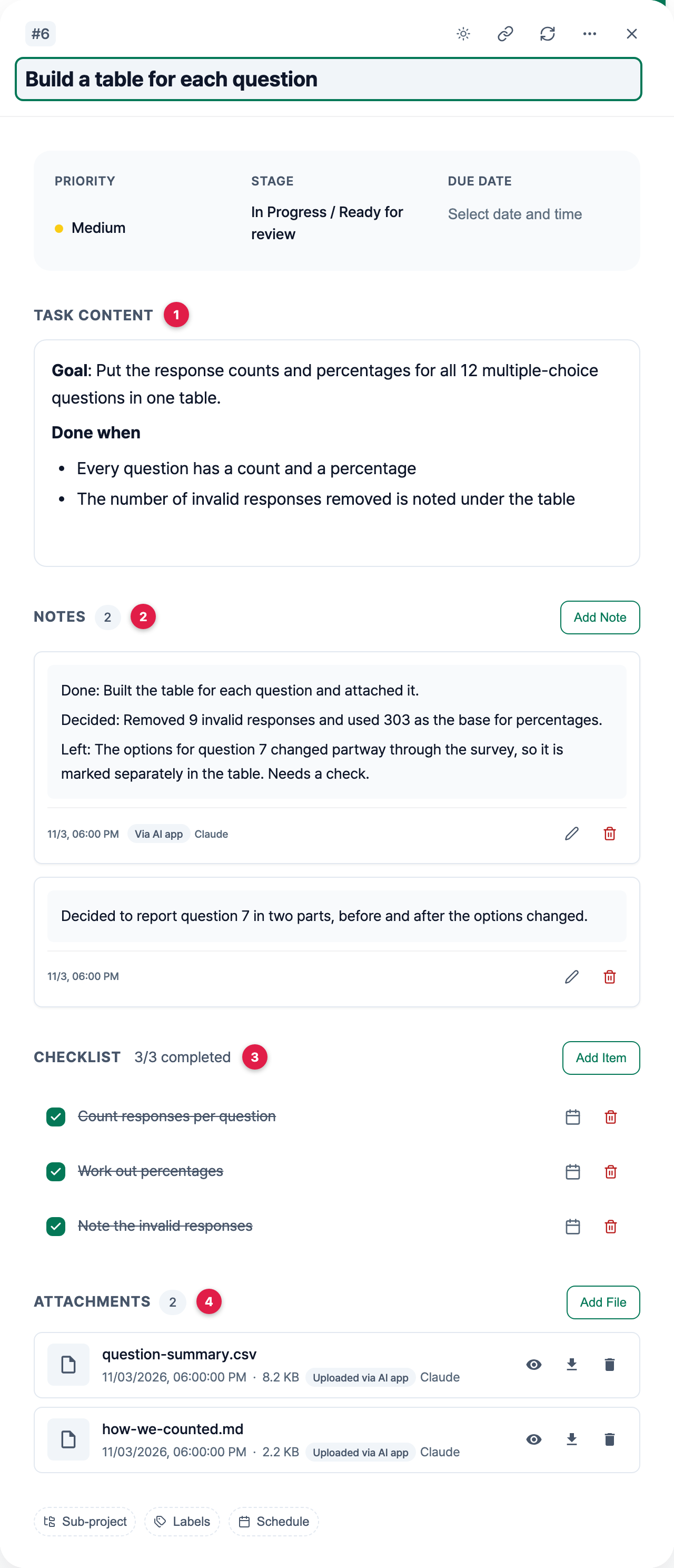
1. Body (Task content): the goal and done criteria
The body is the Task content section in the task details. Use it to say what the task is for and when it counts as done. You set the goal and the done criteria, and the AI reads them before it starts. With done criteria in place, you also know what to check when the AI says it’s finished.
2. Notes: done, decided, left
Notes are where progress gets recorded. Ask the AI to add a note each time it finishes a stretch of work, with one line each for what it did, what it decided, and what’s left. The next chat can then start from what’s left. The note in this example records the decision to remove 9 invalid responses before working out percentages. Without it, you’d only have the numbers, and you’d have to ask again how they were calculated.
What you check and decide goes in the same list of notes. In this example, you noted the decision to report question 7 in two parts, before and after its options changed. Notes from an AI app carry a label, so you can tell who wrote what. Telling AI-written notes apart from your own explains how the labels work.
3. Checklist: the small steps inside a task
List a task’s small steps, in order, on its checklist. If the AI checks off each step as it finishes, you can still see how far it got even if the chat breaks off partway.
4. Attachments: the files you made
Attach the AI’s output to the task as files, whether it’s a table, a draft, or research notes. A connected AI app can upload the tables and documents it makes, and it can read the contents of attached text files too. For keeping records as Markdown files and finding them again after a task is archived, see Where to keep the notes from working with AI.
Give the AI rules for keeping records
If you give the AI these rules at the start of a chat, it leaves a record in the same format each time it finishes a stretch of work.
While you work on this task, follow these rules for keeping a record.

- Before you start, read the task's body, notes, checklist, and attachments.
- Check off each checklist item as you finish it.
- Each time you finish a stretch of work, add a note with one line each for what you did, what you decided, and what's left.
- Attach the tables and documents you make to the task as files. If you upload a revised file, say what changed in a note.
- Don't change the goal or done criteria in the body. If you think they need to change, ask me first.
In a new chat, have the AI read the task first
In the new chat, don’t paste in the old conversation. Name the task you want to continue and ask the AI to read its record first.
I want to continue the "Group open-ended answers by theme" task in the "Customer survey report" sub-project in toodoori.

- Read the task's body, notes, checklist, and attachments first, then summarize what's done and what's left.
- Once I've checked the summary, carry on from what's left.
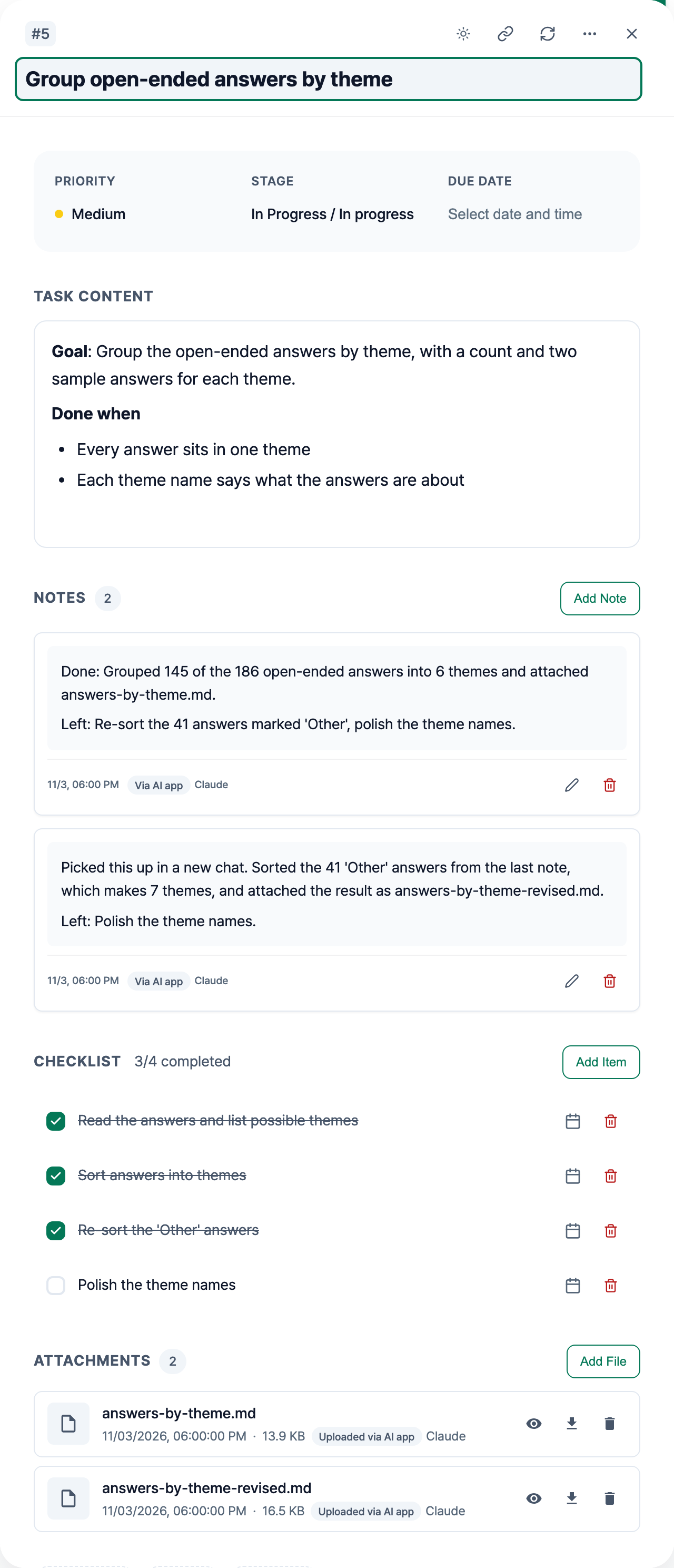
Check that the AI’s summary matches what you know before it carries on. If something’s off, correct it right there, and add the correction to the notes.
Here’s a task that was continued this way. Claude wrote the first note in the earlier chat and the second note in the new one. The second note starts from what the first note listed as left.
Moving on to the next task
The AI can also read a task’s record when the next task starts. In this example, before the AI writes the report draft, ask it to read the notes and attachments on the question tables task and the theme grouping task. The relations map shows which tasks come before which. Track AI Agent Work on a Board and Relations Map explains how to read the order.
Worth reading next
- Seeing the order of tasks and where each one stands: Track AI Agent Work on a Board and Relations Map
- Attaching Markdown records and finding them again in the archive: Where to keep the notes from working with AI
- Connecting an AI app: Connect toodoori to ChatGPT and Claude with MCP